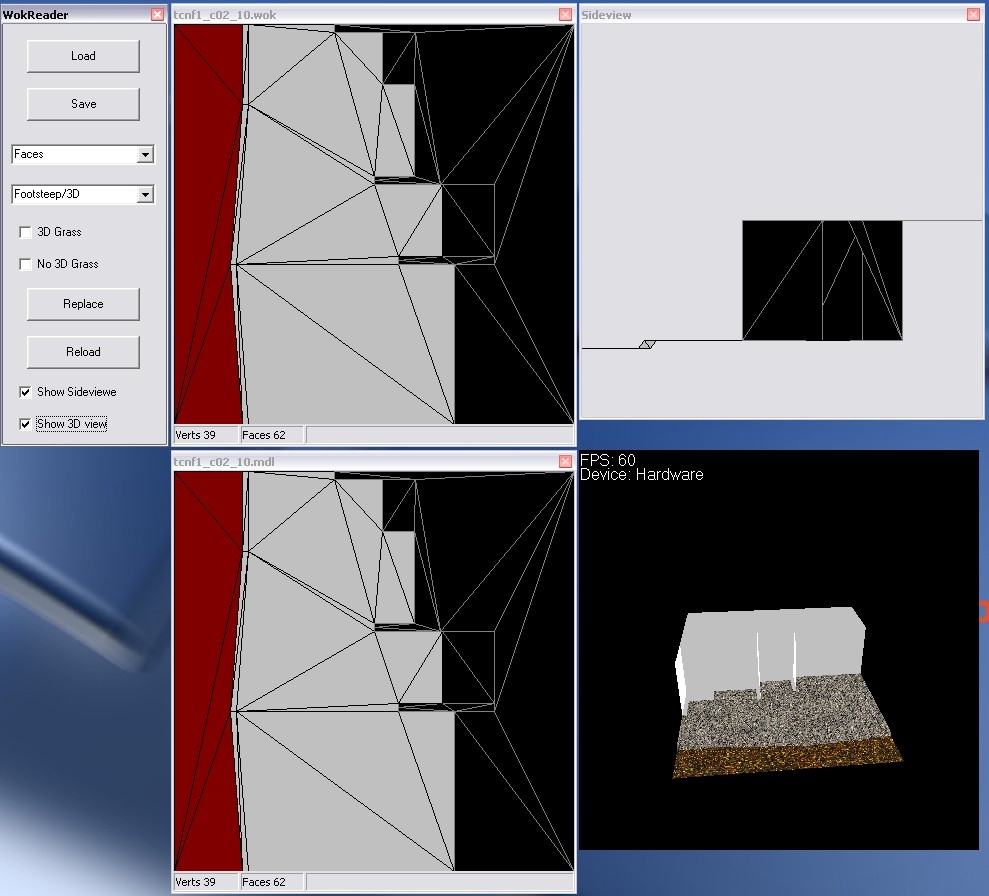
This little tool can open Tileset walkmesh (.wok) and Placeable walkmesh (.pwk) and edit the footstep sound and 3D effects. Let me know if I should work some more with it, to enable changing of the Points of the faces or something else. Version 7 this one works again but it is not posible to add, remove or change points (verts), it is only posible to change 3D anim. (in mdl file) and sounds (in wok file). I have added a 3D view of the walkmesh model and a 2D side view. Im stil working on the add, remove and change thing... but it will take some time.. Updaded to suport snow, sand is the same as dirt... Updaded to suport mouse drag.. the grafic is blinking.. Updated to loade model into 3D window.. Fixed bug in Replace function....
Posted by Virgil at 2009-01-07 06:29:59 Voted 9.00 on 01/07/09
I can't believe I once editing a walkmesh by hand before I found this great little program. It's perfect for replacing footstep sounds when copying tiles from one tileset to another. The only thing it's missing is the newer Sand footstep, and I do wish there was a batch replace option.
I believe one commenter pointed out that sometimes the program will corrupt the MDL file of a tileset. I've noticed that a few times, too. I normally just use the WOK file, and restore the MDL file from the backup the program automatically makes (which is very convenient!!). For changing footsteps, altering just the WOK seems to work.
Hi Oseryn if you still need the update, send me a wok and mdl file withe the walk type, and ill se if i can finde the source code some where.
And thanks fore the vote :)
Posted by Oseryn at 2008-07-31 08:18:17 Voted 10.00 on 07/31/08
Sass, a very belated thank you for this utility. I've used it extensively and it's a life saver.
I understand it's a remote request at this point, but just in case... I am adding tropical beach tiles to the desert set and tried to use your editor to change the grass to sand.
However, with no 'sand' option (even though sand and dirt may be the same) many faces appear black - or have a random color selected - and have no linked footstep sound selected.
When clicking on one of these faces, the footstep pull-down shows a blank entry. I believe this is due to the tiles having 'sand' footstep sounds.
I have tried to convert these "blank" faces to dust /w dirt, but the resulting tiles crash the toolset. I'm guessing the resulting tiles are corrupted due to the Wok Editor loading the wok with unknown face footsteps.
What's the chance of a change to the Wok Editor to support the 'sand' footstep option? _________________________ Lysithea: Farsong designer at nwnlysithea.org
[aka Chrysoli on Bioware Forums]
Hi s030363l, it migth be that the structure of the .mod or .wok have changed, so when the tool expect a number it get a word instead. I will se if I can get the time to look at it but to be honest I dont thik so , sorry.
Im glade that the tool still have some use. Thanks for voting.
Posted by NWC_Snake at 2007-06-04 15:50:28 Voted 10.00 on 06/04/07
Hail! I have found this tool incredibly useful. It can correct the incorrect tile walkmesh material settings that are exported from Gmax by some export scripts, making it indispensable for tileset builders.
rdx: what would you like it to do, I have tryed to make it posible to move the "verts" but this mesed up the mdl file, so no changing of size or shape only materials.
BR, Sass
Posted by Barry_The_Hatchet at 2006-04-29 06:44:42 Voted 10.00 on 04/29/06
10 out of 10. This is exactly what I've been looking for. Thanks _________________________ Barry The Hatchet Custom Content
[ BTH Vault Submissions] [ BTH Gallery] [ BTH Blog]
Posted by rdx at 2005-10-25 15:05:29 Voted 9.50 on 10/25/05
I'm using it 3 months, great prog, saves a lot of time.
Big '+': EASY
Small '-': interface, loading speed
Are you going to update this tool?
Posted by Sass ( 194.255.xxx.xxx ) at 2004-10-08 14:31:00
Christopher: Actualy I dont change or edit the pathnodes, that is in the .set file right? this only edit the .wok and the aabb part of the .mdl files.
Hmmm the diagram looked better on the Bioware posts. Not sure of my req. would make a diff in your app. It has helped a lot in getting my sounds right.
"Imagination is the one weapon in the war against reality." -Jules de Gaultier
Posted by Sass ( 194.255.xxx.xxx ) at 2004-08-10 11:57:00
I have fixed the Replace bug, sorry for the slow response speed... (have a lot of work at the last year)
If you convert the model tga files to bmp files and place them in the same dir as the program, the program will use this bitmaps when displaying the 3D image.
I am doing a lot of work that involves copying tiles from one tileset to another and reskinning them as needed. I also have to edit the walkmeshes, and the problem is that while this tool handles WOK files perfectly, it will corrupt the MDLs in many cases.
Sure, I can work around it manually, just by editing the aabb in the MDL manually, but it is annoying.
Any chance of a fix soon?
Posted by Sass ( ..xxx.xxx ) at 2004-04-14 02:10:00
Sorry Khaly, for the slow reply... :-(
Yes it takes some time to load the walkmesh, I will try to optimize this..
I have looked at the edit points, and will try to make it possible in v9.
I have noticed a problem with the Replace function, it can sometime damage the model by making one of the walkmesh materials -1 (should be 0-16). This will be corrected in v9
- Sass
Posted by Khaly ( ..xxx.xxx ) at 2004-03-29 13:22:00
That tool is just what I was looking for; make it possible to edit XYZ position of the points and it would be just perfect...
Two tumbs up, realy good job.
(On my machine it takes a good 15 seconds to open up a mesh, is that normal ?)
Posted by Khaly ( ..xxx.xxx ) at 2004-03-29 13:21:00
That tool is just what I was looking for; make it possible to edit XYZ position of the points and it would be just perfect...
Two tumbs up, realy good job.
(On my machine it takes a good 15 seconds to open up a mesh, is that normal ?)
Posted by Sass ( ..xxx.xxx ) at 2004-02-23 00:29:00
Hi, I have made a version, witch loads textures for the model. The texture files have to be in the same dir as the mdl file and converted to bitmap (.bmp). The texture orientation is not always correct but it looks ok. Is this a version you want uploaded?
This is a compilation of the old system into a single score. There were 4 that made this score of 8.75 then rounded to 9.
Posted by Sass ( ..xxx.xxx ) at 2003-08-04 04:37:00
Thank, it is always great to get feedback..
- I will try to make it possible to hold the left mouse button down over a surface (not walkable) and then drag the mouse round and change all the polys it is dragged over, is this useable?
- I dont know about the crash, it would be very useful if you could find out more about it..
- I have planed to make the 3D panel load a "ghost" of the model (transparent gray) to se the whole picture, this takes a lot of time to get right, so maybe some day..
Posted by Lost Dragon ( ..xxx.xxx ) at 2003-08-04 00:58:00
This thing is cool
Suggestions:
Make it so that you can "drag the mouse and select" in the editor. I want to be able to hold down my mouse button and paint a bunch of polys "no walk" for example.
Sometimes it crashes on me. I think this has to do with pressing "n" for no walk and clicking an area at the same time.
I don't guess there is a way that you could make this program load a tile model and paint it with textures with the walkmesh showing over the model?
As an example, I'd load a tile and it'd show where walk/no walk was specified.. And then I'd paint textures over the walkmesh (grass over walkable, rock texture over not walkable, etc)..
I guess that's what 3dmax is for.. 'cept this thing is a lot easier to use :p
Good job. ^__^
Posted by Sass ( ..xxx.xxx ) at 2003-08-02 01:43:00
Yes, I will do that. Just have to finde out what snow and sand index is...
Posted by Yavel ( ..xxx.xxx ) at 2003-08-01 11:51:00
Looks like a great tool. Any plans to update it for SOU? There doesn't seem to be a replacement option for snow or desert sounds.
Posted by Sass ( ..xxx.xxx ) at 2003-05-21 06:17:00
CID-78: Your right. It dos not work. I have hade some problems with my NWN, but it is up and running now. I have found some major errors in the tool sorry.
The problem is that the .mdl and .wok files not always has the same walk mesh, when the tool opens the files, it only looks at the .wok file. When the files is saved the .mdl file walk mesh section is over written, this is not acceptable. Im working on a new release, where this is fixed.
Sorry for the trouble and falls hopes.
Posted by CID-78 ( ..xxx.xxx ) at 2003-05-18 01:45:00
This thing doesn't work. I can't open any .wok at all i get a error each time. i tried both bioware and hakcontent. it just spit me a error with a integer in it.
i am running on windows XP
Posted by Sass ( ..xxx.xxx ) at 2003-04-28 10:10:00
I have some problems with the tuturial, and to use any custom hakpaks in the toolset, it crashes every time. I have to get this working befor working more on the tuturial.
Posted by Sass ( ..xxx.xxx ) at 2003-04-25 04:09:00
jules: can you send me the .mdl and .wok file. Then I can make a tuturial on how to use the program to change walkmesh.
I will upload the tuturial on how to use this tool after the weekend. It would be nice to know what you guys out there would like me to put into this tuturial.
Posted by jules ( ..xxx.xxx ) at 2003-04-25 03:33:00
I'm really sorry to do this... but can someone run through how to use this tool for me. I'm trying to change the size of the walkmesh on a coffin i downloaded as part of a Hak ( very possibly from Vampire, the Masquerade). The Walkmesh file opens up ok- Firstly- is it possible to open the coffin MDL. file so I can compare directly when I've got the mesh size correct? secondly- how do I actually change the size of a rectangular mesh?... I can add extra corners or pull it into various wierd shapes, but basic rectsangles are defeating me.... sorry to hassle you guys, but this coffin looks fantastic in a set piece in my latest mod- if only PCs didn't walk halfway into it!






 Site
Site









 at 2011-12-21 19:12:18



 at 2004-10-06 12:43:00


