ENGLISH:
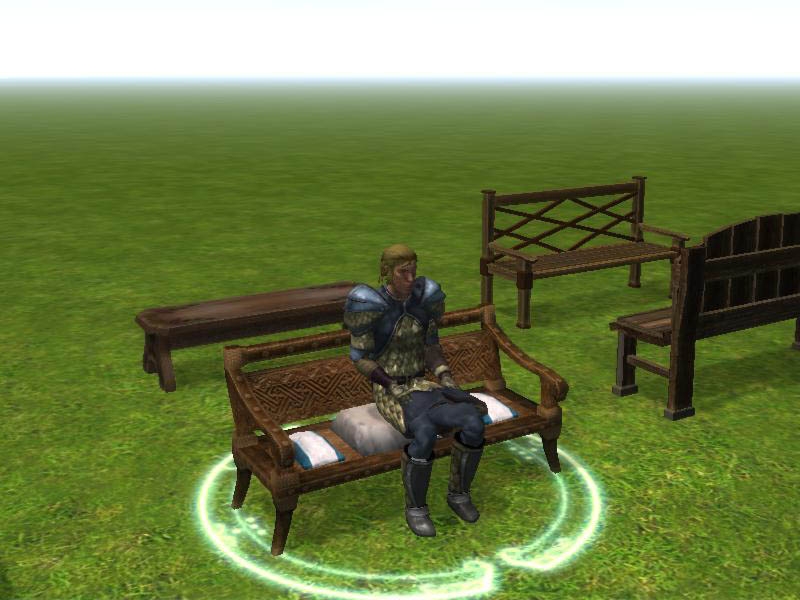
I'm providing to you the way to let objects be "sittable" and the script that allow PC to sit on them!
v1.00
Included files are:
- script (in a .erf to import)
- the English and Italian tutorial to bring objects "sittable"
- a module with many benchs and chairs, to test this method
v1.50
- Now the system/method is adapted to different sized PCs.
- Now the .erf contains a dialog, for feedbacks, too.
v1.60
- Now the twisting degrees for sitting PCs and the PC size target are setted by local PLCs' "Variables" in the "Properties" window, no more by specific forced target.
- Tutorial explains how to update from old versions.
- [NWN2 Patch 1.03] Italian female feedback now avaible for wrong sized PCs.
- Now you can decide to download an .erf version which contains 4 sample benchs already setted.
v1.65
That update interests only tutorials and SitArea sample module.
It adds a suggestion on how to make double or multiple seat objects.
It's yet based on 1.60 "pat_sitting" script, so doesn't require an update of old single seat objects.
v1.75
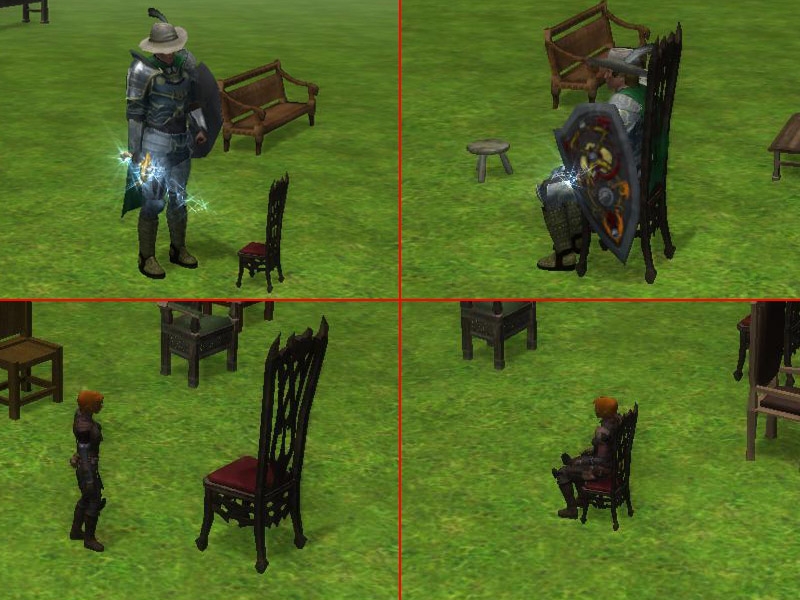
- New alternative system to create auto-fitting sit objects for both PCs height (compatible with old system)!
- Invisible sit boxes' blueprints for 1.65's multiple seat objects (instead of lowered stools)!
- "pat_sitting" script will automatically recognize taken seats.
- 4 benchs samples blueprints (various types), and auto-fit samples blueprints: 2 stools and 2 chair.
- While sitting, PCs heading will not overcome 360°.
- Tutorial file is in pdf format. You may need Adobe Acrobat Reader 8.0 to read it: Link - Italian and English materials are splitted into only two main downloads (plus SitArea sample module).
v1.76
- [NWN2 Patch 1.06] Now feedbacks will be whispered instead of talked.
NOTE: that solution doesn't use the script "ActionSit()" and doesn't require an hackpack.
And potentially may work with every object! Not just chairs and benchs!
It only needs some "manual work"... (READ THE TUTORIAL!!!).
------------------------
ITALIANO:
Vi fornisco il modo per rendere "sedibili" (suona da schifo, ma a me piace così :D) gli oggetti e lo script per permettere ai PG di sedercisi sopra!
v1.00
I file inclusi sono:
- script (contenuto in un .erf da importare)
- i tutorial in inglese e in italiano per rendere "sedibili" gli oggetti
- un modulo con delle sedie e delle panche, per provare questo metodo
v1.50
- Ora il sistema/metodo è stato adattato ai PG dalla statura differente.
- Ora il .erf contiene anche un dialogo, per i feedback.
v1.60
- Ora i gradi per girare i PG seduti e la categoria di dimensione dedicata sono settati tramite "Variabili" locali dei PLC nella finestra delle "Proprietà", non più tramite specifici target forzati.
- Il manuale spiega come aggiornare dalle versioni precedenti.
- [Patch 1.03 di NWN2] Ora sono disponibili i feedback in italiano per i PG femminili di dimensioni non consentite.
- Ora potete decidere di scaricare una versione del .erf che contiene 4 esempi di panchine già settate.
v1.65
Questo aggiornamento riguarda soltanto i manuali ed il modulo dimostrativo SitArea.
Aggiunge un suggerimento su come creare oggetti dalla seduta doppia o multipla.
È ancora basato sullo script pat_sitting 1.60, quindi non richiede l'aggiornamento dei vecchi oggetti a seduta singola.
v1.75
- Nuovo sistema alternativo per creare oggetti auto-adattanti alla statura del PG che si sta sedendo (compatibile col vecchio sistema)!
- Dei progetti di Box invisibili per la seduta, inclusi per gli oggetti a seduta multipla della 1.65 (invece degli sbabelli ribassati)!
- Lo script "pat_sitting" riconoscerà automaticamente i posti a sedere già occupati.
- 4 progetti di panche d'esempio (vari tipi), e progetti auto-adattanti d'esempio: 2 sgabelli e 2 sedie.
- Mentre si siedono, la direzione dello sguardo dei PG non andrà più oltre i 360°.
- Il manuale è in formato pdf. Potreste aver bisogno di Adobe Acrobat Reader 8.0 per leggerlo: Link - Il materiale italiano ed inglese è stato diviso in due download principali (più il modulo d'esempio SitArea).
v1.76
- [Patch 1.06 di NWN2] Ora i feedback verranno sussurrati invece che parlati.
NOTA: questa soluzione non usa lo script "ActionSit()" e non richiede un hackpack.
E potenzialmente può funzionare con qualsiasi oggetto! Non solo sedie e panchine!
Serve solo un po' di "lavoro manuale"... (LEGGETE IL MANUALE!!!).
The .rar file contains:
- *.erf files, (read following included file for contents)
- *_Contents.txt, .erf file contents explanation
- *Tutorial.pdf, 1 long tutorials, with patchs modifications
Il file .rar contiene:
- il file *.erf, (leggi il seguente file incluso per sapere il contenuto)
- *_Contenuti.txt, la spiegazione del contenuto del file .erf
- *Tutorial*.pdf, 1 lungo tutorial, con le modifiche delle patch
I didn't know that was different from NWN1 for other racial sizes...
Posted by Lance Botelle at 2010-01-23 05:35:09 Voted 8.50 on 01/23/10
Hi Patcha,
Thanks for the very useful script. Animations are not one of my strongest points and as ActionSit no longer works, this is a very simple and efficient workaround. The prepared placeables are also a bonus. I am using this in my own mod more for the benefit of seating NPCs than allowing PCs to sit.
I am currently trying to alter the script slightly to prevent the NPCs from standing up or look awkward on their seats when they swivel to speak to PCs. Other than this, I like the results. :)
Thanks again. Lance. _________________________ World of Althéa Blog: Link
Posted by PGB01 at 2010-01-12 08:50:31 Voted 9.25 on 01/12/10
Thank you.
Posted by SubHeaven at 2008-07-08 07:15:42 Voted 9.00 on 07/08/08
Very usefull. I'm using the SitBox.
There where a bug where the PC sitting in the air before being transported for the SitBox Location.
I changed ActionJumpToLocation for simple JumpToLocation and ActionPlayCustomAnimation for PlayCustomAnimation to fix this issues for me.
Thanks for the Blueprints.
Posted by Tartaro at 2008-06-05 12:35:20 Voted 7.50 on 06/05/08
Good. I send you by mail some changes I've done for my PW, if you like them you can use.
Next patch comes with a SetScale() function. Do you plan on upgrading this so the chair gets scaled automatically instead of deleting it to create another one? _________________________ Reino de Aldor
Unfortunately the development is stopped until 1.11 will be released (or may be further more).
I fear people who will use MoTB will have to manually add new races to the "medium"/"small" check. ;) _________________________ by Patcha -> my vaultages <-
Grazie per il voto e per il commento! ;)
Sto pensando se ritardare l'animazione di un po' potrebbe aiutare... in futuro vedremo... ho tante altre cose ora su cui metter mano e/o da completare. :) _________________________ by Patcha -> my vaultages <-
Posted by Nessuno at 2007-09-16 09:00:21 Voted 9.50 on 09/16/07
L'ultima versione con le sedie adattabili, dà alcuni problemi nel multi. Non sempre vengono visualizzate le animazioni che fanno vedere il pg sedersi.
Ma nel complesso un ottimo lavoro, sopratutto per me che "odio" le sedie divise per razza^^
Quindi 9.50, perchè credo abbia ottimi margini di miglioramento!
I know I'm not so good to explaing things... that's also a problem in real life. :(
Then... when I have to do it in English is even more harder for me!
But I may rewrite tutorial without explaining "patches changes" into separate chapters and/or colors... it may help?
However I thinked invisible boxes for "multi-seat" objects purposes... because it's not good for 1.75 "auto-fit seats" system.
But, in fact, if you don't want an auto-fit seat, you could use invisible box for a single seat object, too. :) _________________________ by Patcha -> my vaultages <-
Posted by over_my_head at 2007-06-29 18:40:47 Voted 9.50 on 06/29/07
I am back again to redraw me vote and submit an even higher one. I found the system being much more better, solid and easily manipulatable ever since the release of 1.75 and sequals. Your system has become the most used system (also most time consuming) in my server. The only minor point is that you tend to describe and explain it more complicated than it is in reality. I have been reading your tutortial over and over just to understand how this can be used exactly. But now I have the hang of it, and with the release of the invisible sitting boxes, sitting has become again simple, easily adaptable to other things than just chairs and benches, and much more similar to sitting in NWN. I just place your bench, make it static, and then use my invisible boxes. Easy, fast, and makes the inn even more inn (as we couldn't sit before).
So I would only advise you revising your tutorial for beginners at the toolset, as it can be quite confusing with all the different entries in it. Thanks again, and I will follow your works in the near future, and after and already long for it with great urge.
Posted by [email protected] at 2007-06-13 19:58:41 Voted 9.75 on 06/13/07
Just saw this used in a module I was running through. System looks awesome - easy to use, and nothing else like it apparently. _________________________ Jackyo [email protected]
Posted by over_my_head at 2007-06-02 12:32:04 Voted 9.50 on 06/29/07
It is my pleasure. The standing issue is still in the 1.75 version. It almost never occures on benches that automatically adapt to the size of the PC, but especially the two grey benches on the north seem to create the issue. I click on it, and the pc places himself in the middle of it, only a couple of seconds later he is seated. It's funny but perhaps got something to do with the engine not running the emotions smoothly enough, or fast enough.
Thanks for the vote!
You noticed the "stand-up" problem before or after 1.75?
Can you explain me when it seems to happen? _________________________ by Patcha -> my vaultages <-
Posted by over_my_head at 2007-06-02 01:20:08 Voted 9.50 on 06/29/07
Excellent work. I am implementing it right now, never thought sitting would be so different compared to NWN. I am not giving you a 9.50 yet, because I found it still time consuming and sometimes you have to double click on the chair if you don't want to end up standing in the middle of the chair. (That was a correct working chair in your module) I will follow your work and I am sure you will work yourself up to the top, and I will definately keep on downloading the newer systems an vote even higher. Thank you for this wonderful system, especially with v.1.75 sitting is becoming much easier and better (not being only tied to chairs and benches, but also other stuff).
- New alternative system to create auto-fitting sit objects for both PCs height (compatible with old system)!
It works destroying unfitting sit object for sitting PC, and spawn a new one better fitting from a previously created blueprint!
- Invisible sit boxes' blueprints for 1.65's multiple seat objects (instead of lowered stools)!
So you can create multiple seat objects without worry if stools may be visibles. You could use wood benchs, too!
- "pat_sitting" script will automatically recognize taken seats.
That will prevent taken seats to be used to activate sit script.
- 4 benchs samples blueprints (various types), and auto-fit samples blueprints: 2 stools and 2 chair.
1.60_samples version benchs with new "Resource" and "Localized" names and another 4 auto-fitting sample blueprints.
- While sitting, PCs heading will not overcome 360°.
I'm not sure if that could create some issue before, but now surely it does not!
- Tutorial file is in pdf format. And all file are compressed in .rar format instead of .zip!
That means that you need to download only 250 KB instead of 2.2 MB!
- Italian and English materials are splitted into only two main downloads (plus SitArea sample module).
So I'm sure (and you are sure) that you'll download tutorial, too! :D REMEMBER TO READ IT!!!
~~~~~~~~~~~~~~~~~~~~~~~~
ITALIANO:
- Nuovo sistema alternativo per creare oggetti auto-adattanti alla statura del PG che si sta sedendo (compatibile col vecchio sistema)!
Funziona distruggendo l'oggetto inadeguato al PG per sedersi, e generandone uno più adatto da un progetto creato in precedenza!
- Dei progetti di Box invisibili per la seduta, inclusi per gli oggetti a seduta multipla della 1.65 (invece degli sbabelli ribassati)!
Così potrete creare oggetti dalla seduta multipla senza preoccuparvi se gli sgabelli sono visibili. Potrete usare anche panchine di legno!
- Lo script "pat_sitting" riconoscerà automaticamente i posti a sedere già occupati.
Questo eviterà l'attivazione dello script tramite l'uso di posti a sedere già occupati.
- 4 progetti di panche d'esempio (vari tipi), e progetti auto-adattanti d'esempio: 2 sgabelli e 2 sedie.
Le 4 panche d'esempio della versione 1.60_samples con nuovi nomi "Risorsa" e "Localizzato" ed altri 4 progetti d'esempio per gli oggetti auto-adattanti.
- Mentre si siedono, la direzione dello sguardo dei PG non andrà più oltre i 360°.
Non so se questo poteva creare problemi in passato, ma ora sicuramente non può.
- Il manuale è in formato pdf. E tutti i file sono compressi in formato .rar invece che .zip!
Questo significa che dovrete scaricare solo 250 KB invece di 2.2 MB!
- Il materiale italiano ed inglese è stato diviso in due download principali (più il modulo d'esempio SitArea).
Così sono sicuro (e voi siete sicuri) che scaricherete anche il tutorial! :D RICORDATEVI DI LEGGERLO!!! _________________________ by Patcha -> my vaultages <-
Posted by Evliss at 2007-03-12 15:31:38 Voted 9.00 on 12/07/07
Ok, I finally located my problem and it was something stupid. I still had a couple of tiny no-walk areas I didn't see from before near where I put my bench. This is what was pushing my char. out of position. Doh!
Posted by Evliss at 2007-03-12 06:17:26 Voted 9.00 on 12/07/07
After I tested it, I went back into the toolset and put a stone bench on top of the stools that were already lowered. I wonder if the angle or that there were 3 instead of 2 makes a difference.
Posted by Evliss at 2007-03-11 18:41:40 Voted 9.00 on 12/07/07
No. What I did was set 3 stools side by side. Tested them and verified that when used, the person faced in the proper direction. Then, I moved a stone bench over them. Then when I tested it again, it was all messed up. I should mention that all of these were on a 45 degree angle.
10 - A Masterpiece, Genuinely Groundbreaking 9 - Outstanding, a Must Have 8 - Excellent, Recommended to Anyone 7 - Very Good, Deserves a Look 6 - Good, Qualified Recommendation 5 - Fair, Solid yet Unremarkable 4 - Some Merit, Requires Improvements 3 - Poor Execution, Potential Unrealized 2 - Very Little Appeal 1 - Not Recommended to Anyone






 Site
Site










 at 2010-01-23 05:35:09
 at 2007-06-29 18:40:47
 at 2007-06-13 19:58:41


