KEMO Character Biography and Portrait (hereafter KEMO Bio) is an alternate character biography panel that allows players to edit information in-game.
KEMO Bio also brings back NWN1-style large portraits.
To edit your own biography, select the Edit Bio option in the context menu (right-click on your character). To view another character's biography, select Inspect from the context menu after selecting the other character. (Both of these options are right below Examine on their respective context menus.)
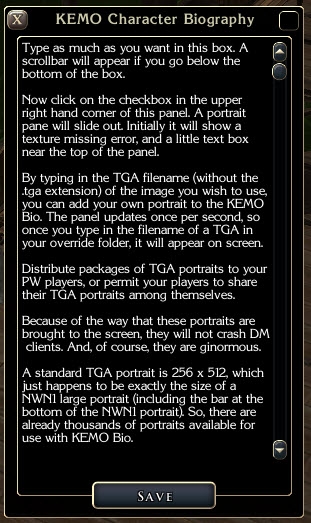
When editing your bio, type as much as you want to into the box. A scrollbar will appear if you go below the bottom of the box.
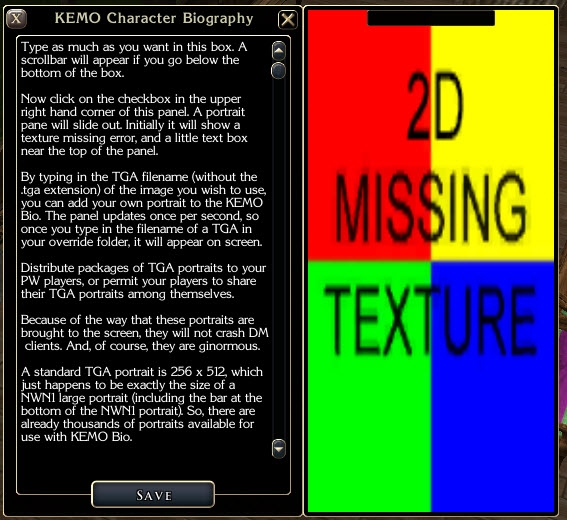
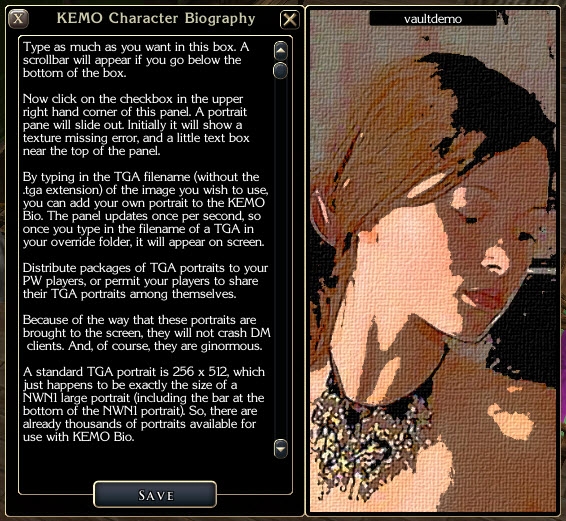
To add or view a portrait, click on the checkbox in the upper right hand corner of the bio panel. The portrait panel will slide out. If you are editing, initially the portrait will show a texture missing error. There is a small text entry box near the top of the panel, and by typing in the TGA filename (without the .tga extension) of the image you wish to use, you can add your own portrait to the KEMO Bio. The panel updates once per second, so when you type in the filename of a TGA in your override folder, it will appear on screen.
Other characters will show their portraits when you click the checkbox, or a texture error if the player has not yet selected a portrait.
BUILDERS/PW ADMINS:
Distribute packages of TGA portraits to your players (as overrides or in a HAK), or permit your players to share their TGA portraits among themselves. In order for a player to see her or another character's portrait, she must have the appropriate portrait TGA in her override folder (or in a HAK, if overrides have been turned off on the server). If a player does not have the necessary portrait, a texture error will appear.
Because of the way that these portraits are brought to the screen, they will not crash DM clients the way standard nwn2 player list portraits do. And, of course, these nwn1-style portraits are ginormous.
A standard TGA portrait is 256 x 512, which just happens to be exactly the size of a NWN1 large portrait. So, there are already thousands of portraits available for use with KEMO Bio.
Note: TGA files tend to be rather large and inefficient. My recommendation would be to convert them to 256 indexed color TGAs, which makes them considerably smaller without sacrificing too much quality. Alternatively, you can convert them to JPEG files but keep the .TGA extension. NWN2 will read them correctly even though they are JPEGs and not actually TGAs.
UPDATE 2/18/09 (version 1.1):
* I added the ability to select a random portrait from a set of portraits. It works as follows:
- create a series of up to 10 portraits
- name each file so that the word "pack" appears in each, somewhere
- put a digit at the end of the filename, 0 to 9
(example: myportrait_pack_0, myportrait_pack_1, myportrait_pack_2, etc.; but the_pack_thing0, the_pack_thing1, etc. will also work)
- when you edit your portrait in the GUI by typing in the filename, type in the filename of the last portrait in the series (so if there are 10, type in the filename of the one with the 9 at the end)
- your portrait panel will now cycle through your portrait pack, showing you the full set, and settle with the last in the set, confirming that it successfully sees all of the portraits in the pack
- when someone Inspects you and opens the portrait panel, s/he will see one of the portraits in the pack, chosen at random each time s/he Inspects
- if you do *not* have a pack, everything will work as normal, showing you and other players the one portrait TGA you entered into the portrait edit panel
- avoid using "pack" in any portrait filename that is not part of an actual pack, as this will prevent it from appearing
UPDATE 2/21/09 (version 1.11):
* fixed essentially cosmetic problems in the UI XML files; if KEMO Bio is working for you, you don't need to get this version
UPDATE 3/14/09 (version 1.12):
* fixed a problem in the script where non-pack pictures aren't displayed properly
UPDATE 9/22/09 (version 1.13):
* removed the portrait toggle; now uses a blank background when no image is present
* fixed a problem in the script where the final image in a pack set wasn't being displayed
UPDATE 10/31/09
* modified this description text, no script/gui changes
(2/24/09) A version of contextmenu.xml that includes the options for PC Tools and DMFI as well as KEMO Bio. (PC Tools and DMFI are the most common contextmenu-altering PW systems.)
Awesome! Thats all there is to say about the new portrait/bio system. _________________________ nwnhaven.com
Posted by kemo at 2009-02-2008:47:03
Unfortunately, it requires that a script be installed in the module itself --- it isn't just a GUI override. You would have to work with the module in the toolset to add and compile the gui_kemo_bio script. _________________________ KEMO Auctions | KEMO Beds and Tables | KEMO Bio | KEMO Custom Animations | KEMO Custom Chairs | KEMO Experience Award System | KEMO Jukebox | KEMO PC Scry | KEMO Storage System Kingdom of Haven admin
Posted by rotorwash at 2009-02-2007:48:36
Since I am just an ignorant player and not a designer, is there a way I can use this as a "plug-in" to an existing module on my own CPU for single player, such as in using an override file?
Posted by kemo at 2009-02-1918:07:07
I don't know about compatibility with 1.22; we won't be upgrading until the patch is officially released. Once it is, I'll check contextmenu.xml for that version. _________________________ KEMO Auctions | KEMO Beds and Tables | KEMO Bio | KEMO Custom Animations | KEMO Custom Chairs | KEMO Experience Award System | KEMO Jukebox | KEMO PC Scry | KEMO Storage System Kingdom of Haven admin
Posted by dj1 at 2009-02-1916:58:40
OK not in Charlie's but contextmenu is in compmonAI. Did AI make it into 1.21 or 1.22? If so, is this compatible? Either way, I'm using 1.12 until 1.22 is fixed so for now it's moot for me. _________________________ "In life, one and one don't make two. One and one make one." -The Who "Bargain"
Posted by kemo at 2009-02-1910:54:17
There's no reason why it should, unless Charlie's affects contextmenu.xml (and I don't think it does). _________________________ KEMO Auctions | KEMO Beds and Tables | KEMO Bio | KEMO Custom Animations | KEMO Custom Chairs | KEMO Experience Award System | KEMO Jukebox | KEMO PC Scry | KEMO Storage System Kingdom of Haven admin
Posted by dj1 at 2009-02-1909:35:00
Does this conflict with Charlie's UI (XML)? I want to extract this from its hak into an override but I refuse to give up Charlie's. _________________________ "In life, one and one don't make two. One and one make one." -The Who "Bargain"
Posted by kemo at 2009-02-1821:23:47
ick, that didn't work. . . comments doesn't like letting me use returns. I'll post the instructions to my server and post the link here. . . _________________________ KEMO Auctions | KEMO Beds and Tables | KEMO Bio | KEMO Custom Animations | KEMO Custom Chairs | KEMO Experience Award System | KEMO Jukebox | KEMO PC Scry | KEMO Storage System Kingdom of Haven admin
Posted by kemo at 2009-02-1821:22:01
Okay, then you can edit it cleanly by doing the following: open your existing contextmenu.xml (in Notepad) and search for the "Default Root Menu" section. In this section you will find a line Below this line, add: A little below this you will find a line that starts _________________________ KEMO Auctions | KEMO Beds and Tables | KEMO Bio | KEMO Custom Animations | KEMO Custom Chairs | KEMO Experience Award System | KEMO Jukebox | KEMO PC Scry | KEMO Storage System Kingdom of Haven admin
10 - A Masterpiece, Genuinely Groundbreaking 9 - Outstanding, a Must Have 8 - Excellent, Recommended to Anyone 7 - Very Good, Deserves a Look 6 - Good, Qualified Recommendation 5 - Fair, Solid yet Unremarkable 4 - Some Merit, Requires Improvements 3 - Poor Execution, Potential Unrealized 2 - Very Little Appeal 1 - Not Recommended to Anyone






 Site
Site