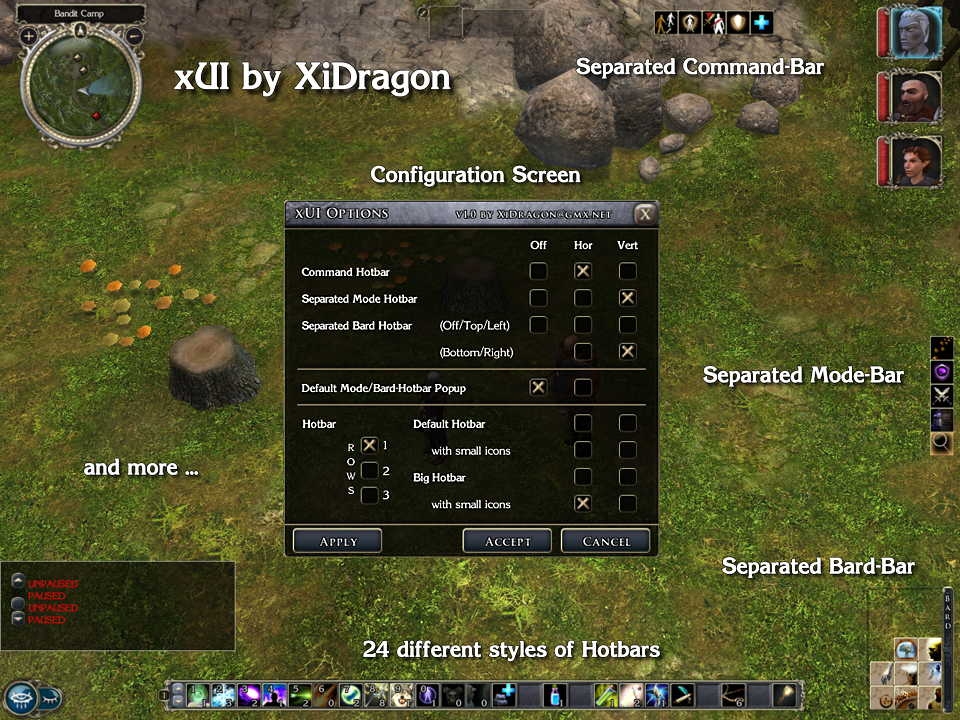
xUI GUI - Command bar, 24 Hotbars, Mode-, Bard Hotbar, Small Party Bar and much more, all configurable via ingame menues.
xUI v1.6 Build 8 for Neverwinter Nights 2
If you want to use this mod or parts of this mod in your own mod, you have to get my authorization first!
NEW in Version 1.6 build 3 to 8
=======================================
Build 8:
- xUI is now fully compatible with NWN2 + MoTB 1.13
Build 7:
- Fixed a bug that prevented the new custom portraits function of NWN 2 1.12 to work.
This only occured if you selected the optional xUI package "Comatiblity with FI Big Fonts UI 1.4" in the xUI installer/configurator.
Build 6:
- xUI is now fully compatible to the new NWN2 Patch 1.12
- Added install option to use xUI together with "Fire&Ice's Big Fonts UI" mod
!!! Only install this optional xUI package if you have "Fire&Ice's Big Fonts UI" mod v1.4 or v1.12 installed!
Build 4:
- Changed handling of GUI ini files for better future compatibility (see section installation for more details)
- Changed install path of xUI Scripts. They are now installed into a subfolder within the override folder.
Build 3:
- xUI is now completely compatible with NWN2 v1.11 and also with MotB v1.11
- Reimplemented option to turn off the standard NWN2 Mode-Bar because the original NWN 2 function to do that is not always working properly
NEW in Version 1.6x
=======================================
- Command Bar commandos can now be issued to targeted henchman or the complete party
(left click whole party, right click and click on target for just that henchman)
- Chat window can be turned off via xUI Options screen
- Small button to open and close the chat window
(located close to the NWN menu button)
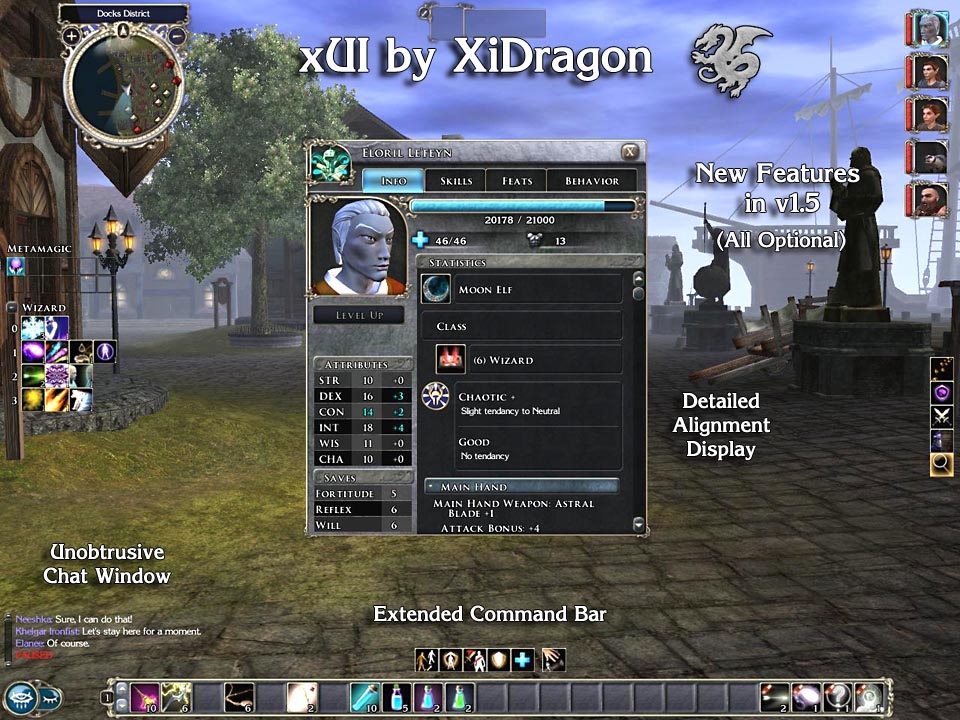
- Unobtrusive chat window (Standalone)
- Enhanced Character Screen (Standalone)
Displays a more detailed alignment and the party leaders Influence on henchman
- Optional additional buttons in the command bar
for switching puppet mode of henchman and equipping resp. unequipping weapons
- Enhanced xUI Config screen for choosing which buttons of the extended xUI Command Bar to activate
(only available when the extended xUI Command Bar and the Main package is installed)
- Some code optimizations
- Removed the option to switch off the default Mode Bar popup, because such a function is now implemented into NWN2 by default
(look under NWN2 Game Options -> Interface)
- Fix of small graphic glitch in the xUI Quickspell menu
- Enhanced Installer - Checks for older installed versions of xUI and asks for Startmenu folder ...
Features
=======================================
- Highly customizable
You can install /activate the elements of xUI you like.
- Ingame Configurator
- Installer and Uninstaller
- External Install Configurator
Lets you add and delete xUI optional installs after xUI was installed.
Main Package features
- Completely configurable via ingame menu and external configurator
- Every new GUI element is optional
- Loads automatically
- UI changes stay after rezoning
- xUI Configuration will be saved with savegame
- 24 differnt styles of hotbars
- Separated Command hotbar ("Stand Ground", "Guard Me" and so on)
- Separated Mode hotbar ("Parry", "Stealth" and so on)
- Separated Bard hotbar
- Std. Mode/Bard bar can be turned off
Optional Standalone Packages
(These packages also work without the main xUI GUI)
- Small Party bar
can be installed together with main package
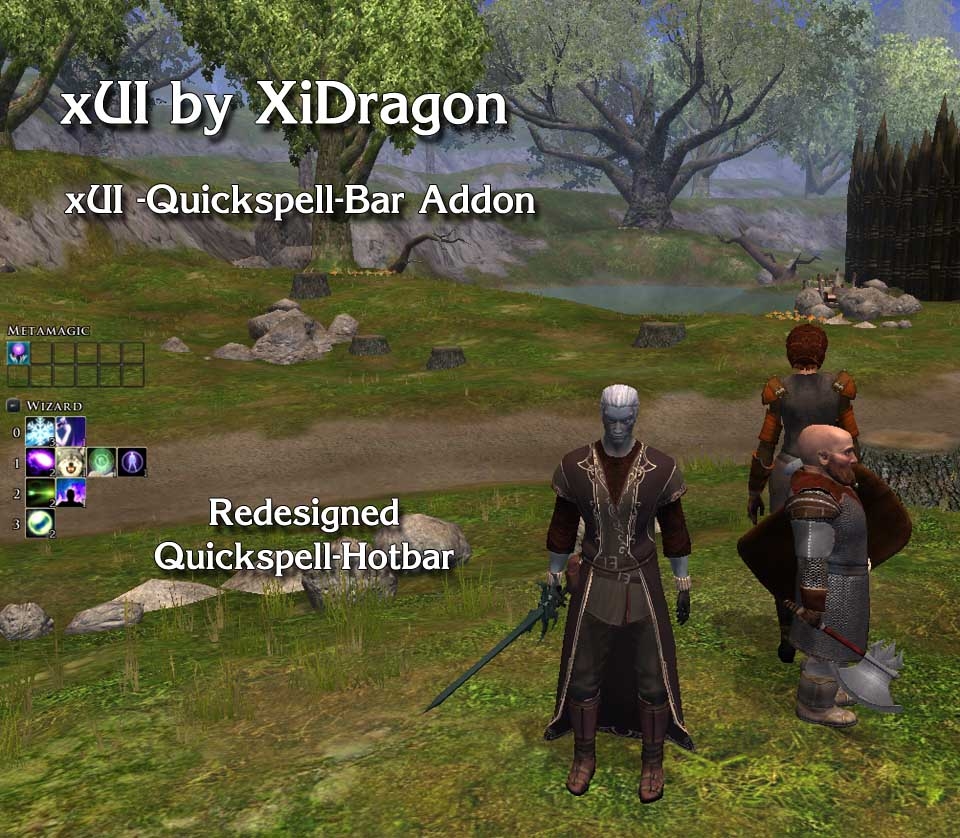
- Unobtrusive Quickcast hotbar
can be installed together with main package
- Command hotbar ("Stand Ground", "Guard Me" and so on)
can not be installed together with main package
- Unobtrusive chat window
can be installed together with main package
- Detailed alignment display on the character screen
can be installed together with main package
The optional installs are standalone versions that do not need the Main xUI to work.
FAQ
===========
1.
Question: How to move xUI elements around?
Answer: Every element that the xUI adds, except the small party bar and the quickspell bar, can be dragged around. They have an 8 pixel border around them where they can be dragged from.
2.
Question: What files will be overwritten by this UI?
Answer: None.
3.
Question: Does this work with PW's?
Answer: Yes, but xUI has to be installed on the server. There is right now no way around this and nothing I can influence because this is how NWN 2 is designed.
4.
Question: My xUI is not working properly since NWN 2 v1.04 how do I fix that?
Answer: Make sure you have installed at least xUI v1.4 and check that the following two NWN 2 options are activated:
- Game Options -> Interface -> Show Horizontal Hotbar 1
- Game Options -> Interface -> Show Modebar
Known problems
===========
1.
In multiplayer the xUI configuration might not be saved.
2.
Hotbar hotkeys do not work completely the same way they work in the default NWN 2 UI. Hotbar hotkeys will only work for the first row of the xUI hotbars. Have a look at the Readme for more details.
3.
At the moment the hotkeys for the hotbar do only work after you pressed Shift-1 once.
I am looking into this to find a solution.
Have fun
XiDragon
xUI History
===========
v1.6 build 8:
- Made xUI fully compatible with NWN2 + MoTB 1.13
v1.6 build 7:
- Fixed a bug that prevented the new custom portraits function of NWN 2 1.12 to work.
This only occured if you selected the optional xUI package "Comatiblity with FI Big Fonts UI 1.4" in the xUI installer/configurator.
v1.6 build 6:
- Made xUI compatible to the new NWN2 Patch 1.12
- Added install option for xUI compatibility files for "Fire&Ice's Big Fonts UI"
v1.6 build 4
- Changed handling of GUI ini files for better future compatibility
- Changed install path of xUI Scripts. They are now installed into a subfolder within the override folder.
v1.6 build 3
- Made xUI completely compatible with the latest NWN2 + MoTB Patch 1.111153
- Fixed the issue that the Minimodebar and Bardbar where not moveable anymore because of the last NWN2 patches
- Reimplemented option to turn off the standard NWN2 Mode-Bar because the original NWN 2 function to do that is not working properly
v1.6 build 1
- Code changes to make xUI compatible with NWN v1.1
- Command Bar commandos can now be issued to targeted henchman or the complete party
(left click whole party, right click and click on target for just that henchman)
- Chat window can be turned off via xUI Options screen
- Small button to open and close the chat window
(located close to the NWN menu button)
- Unobtrusive chat window (Standalone)
- Party Leaders Influence Display on character screen (Standalone)
- Optional additional buttons in the command bar
for switching puppet mode of henchman
- Enhanced xUI Config screen for choosing which buttons of the extended xUI Command Bar to activate
(only available when the extended xUI Command Bar and the Main package is installed)
- Some code optimizations
- Removed the option to switch off the default Mode Bar popup, because such a function is now implemented into NWN2 by defult
(look under NWN2 Game Options -> Interface)
- Fix of small graphic glitch in the xUI Quickspell menu
v1.5 build 1
- Unobtrusive chat window
- Detailed alignment display on character screen
- Optional button in command bar for equipping resp. unequipping weapons
- Some code optimizations
- Enhanced Installer - Checks for older installed versions of xUI, ask for Startmenu folder ...
...
(see the ReadMe for the full history)
10 - A Masterpiece, Genuinely Groundbreaking 9 - Outstanding, a Must Have 8 - Excellent, Recommended to Anyone 7 - Very Good, Deserves a Look 6 - Good, Qualified Recommendation 5 - Fair, Solid yet Unremarkable 4 - Some Merit, Requires Improvements 3 - Poor Execution, Potential Unrealized 2 - Very Little Appeal 1 - Not Recommended to Anyone






 Site
Site